Intelligent Bidding
Intelligent Bidding (IB), also known as Dynamic Bidding, automates bid submission by applying user-configured actions (rules) and condition sets. It is accessed via the Intelligent Bidding tab in Bid Manager.
About Intelligent Bidding
The Intelligent Bidding tab uses a two-panel layout. Two options are available at the top: Actions and Conditions Library.
- Actions (default) — define and manage bidding rules
- Conditions Library — build and manage the condition sets that control when actions fire
Your settings are kept when you switch between the two options.
When the Actions sub-tab is active, a configuration row appears above the main panel. The configuration row contains four pickers (SysWESM Database, Time Periods, Condition library, and Scenario) that auto-populate from Defaults.csv where possible.
Prerequisites
- Working directory initialised
- SysWESM database (
.db) present in DirDB - Time Periods database (
.db) present in DirDB - Condition library database (
iBid*.db) present in DirDB - Scenario configured (required for Save and Validate)
Configure Defaults.csv with DirDB and DirBid paths for auto-population of the configuration row pickers. The Intelligent Bidding tab opens regardless; if DirDB is not set, pickers show the error message "DirDB is not set. Configure..."
Step-by-Step Guide
Follow the steps below to set up and run an intelligent bid.
- Setup
- Condition Sets
- Actions
- Validate and Run
Open the Tab
In Suite, open the Bid Manager tab, then click the Intelligent Bidding tab. The tab opens on the Actions sub-tab by default.
Configuration Row
When the Actions sub-tab is active, a configuration row appears above the main panel. Configure all four pickers (all auto-populate from Defaults.csv where possible):
- SysWESM Database — selects the WESM system database (
SysWESM*.dbfiles) - Time Periods — selects the time periods source file (
.dbfiles) - Condition library — selects the condition library database (
iBid*.dbfiles). Default isiBidWESM.dbif present. - Scenario — selects the active scenario

Conditions Library
Click Conditions Library at the top. The sub-tab switches to the Conditions Library view. The configuration row is hidden on this sub-tab.
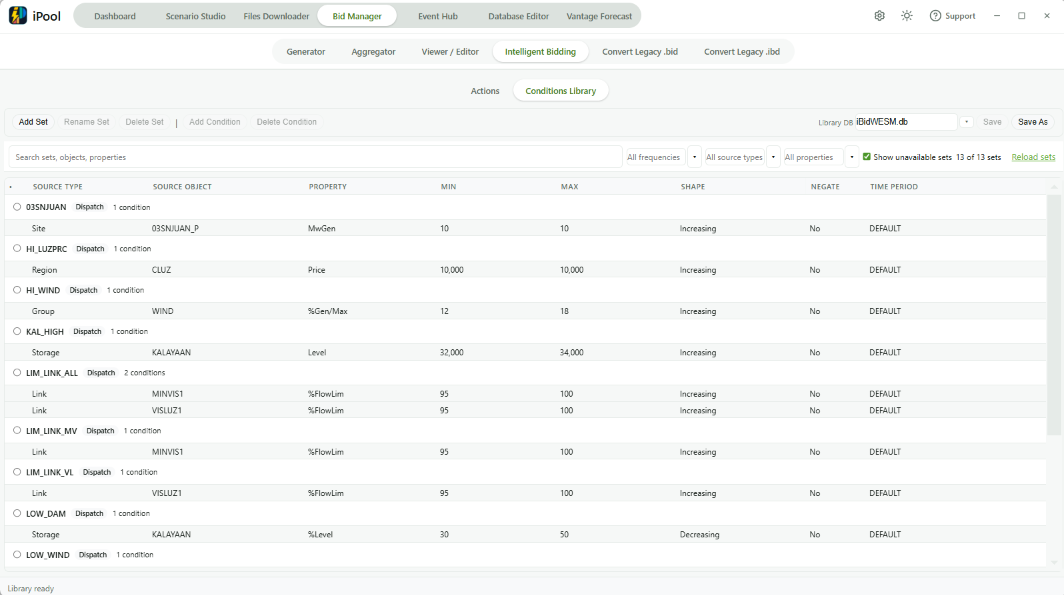
Add a Set
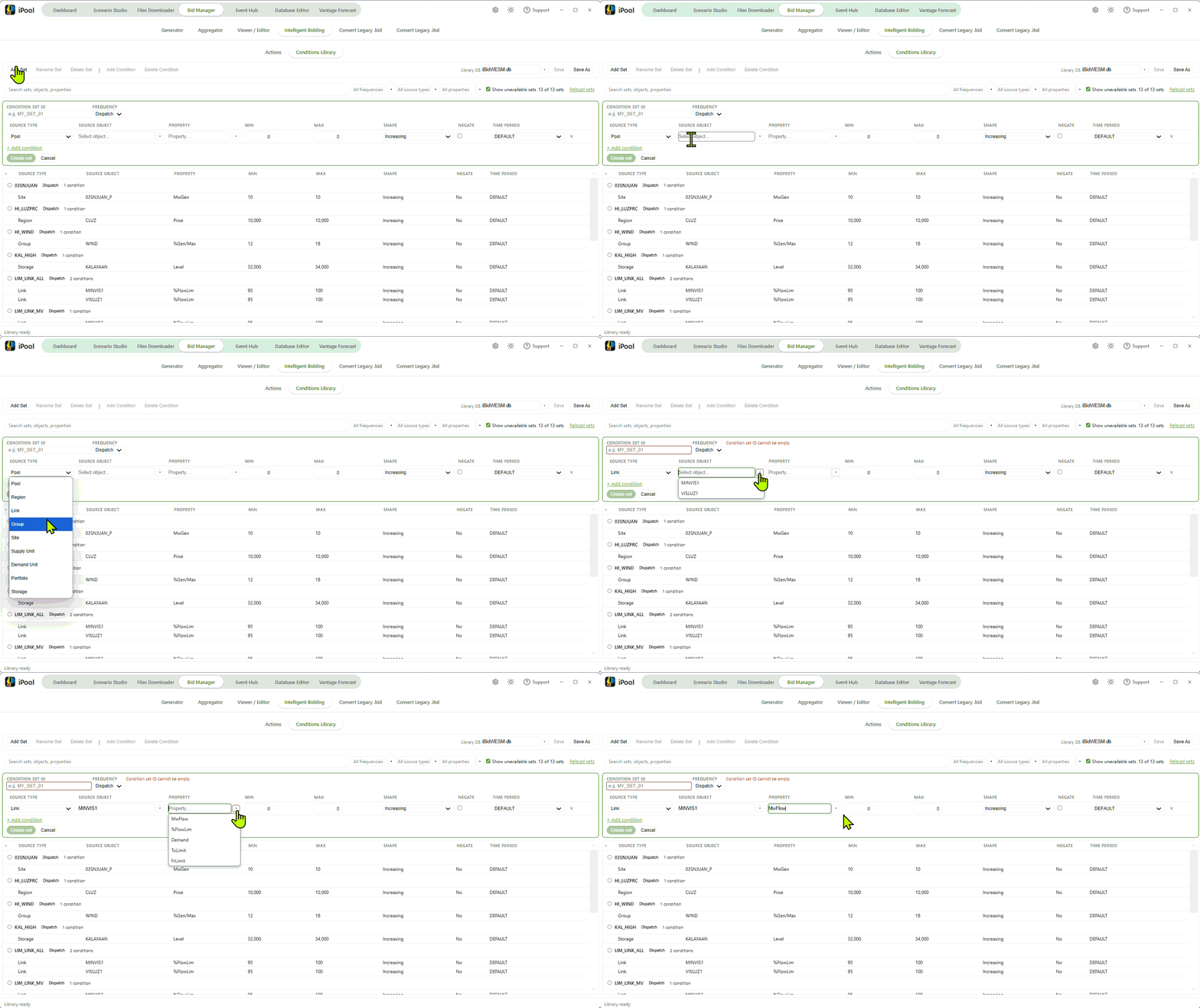
Click Add Set in the toolbar. A new condition set form appears with:
- Condition Set ID — enter a unique identifier (for example:
MY_SET_01) - Frequency — select Dispatch (every interval) or Daily (start of each trading day). Weekly is not valid for condition sets.
Click the confirm button to create the set.
Add Conditions
Click Add Condition in the toolbar to append a condition row. For each row, complete the following fields:
- Source Type — type of data source (Pool, Region, Link, Group, Site, Supply Unit, Demand Unit, Portfolio, or Storage)
- Source Object — the specific object to monitor
- Property — the measured value (Price, MwGen, Demand, and others, filtered by source type and frequency)
- Min and Max — the range defining when the condition is true (defaults to 0 and 100 respectively)
- Shape — membership function: Rectangular, Triangular, Increasing, or Decreasing
- Negate — tick to invert the condition (when ticked, the condition is treated as true when it would normally be false)
- Time Period — select DEFAULT (every day) or a loaded time period
Repeat Add Condition for each condition in the set.
Save the Library
Click Save in the right side of the toolbar to save the condition library to the
loaded .db file. A brief success message appears.
Use Save As to save to a different file.
Actions Sub-Tab
Click the Actions pill in the sub-tab bar. If the Conditions Library has unsaved changes, a dialog ("Unsaved Library Changes") prompts to Save and Switch, Discard, or Cancel.
Add an Action
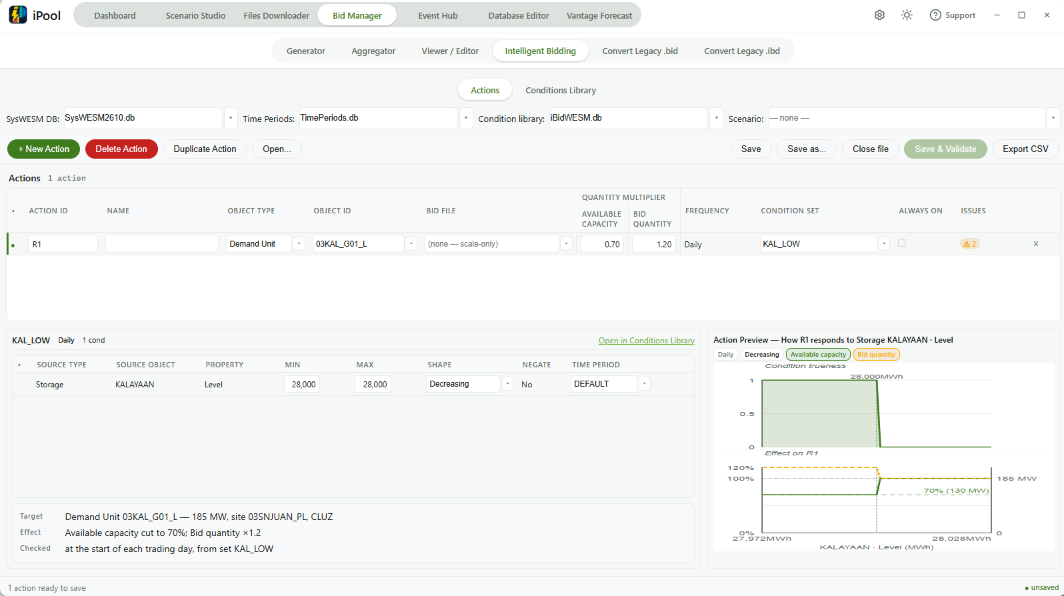
Click + New Action in the left toolbar. A new row appears in the Actions grid with an auto-generated Action ID (format: R1, R2, R3, …).
The empty state shows: "No actions yet — click + New Action to add one."

Configure the Row
For each action, complete the following columns in the Actions grid:
- Action ID — unique identifier; auto-generated as R1/R2/R3/… but editable. Used to identify this action in saved files and in the output log. Must be non-empty and unique within the file.
- Name — display name for readability; not used by the engine.
- Object Type — type of object to target (Supply Unit, Demand Unit, Site, Group, Portfolio, Region, Storage, Link, Meter, or Pool). Object Type is disabled when a Bid File is set.
- Object ID — identifier of the target object.
- Bid File — optional
.bidxbid-curve file. Leave empty for scale-only actions. When set, the bid curve is swapped in when the action fires. - Available Capacity multiplier — applied to the target's offered capacity when the action fires (1 = unchanged). Not available for Pool.
- Bid Quantity multiplier — applied to the target's bid quantity when the action fires (1 = unchanged). Not available for Link, Meter, or Pool.
- Frequency — how often the action is re-evaluated: Dispatch (every interval), Daily (start of each trading day), or Weekly (every 7th trading day from run start).
- Condition Set — the saved condition set that controls when this action fires. Valid sets shown first; unavailable sets shown greyed.
- ALWAYS ON — tick if the action has no conditions and should fire every interval.
Use Duplicate Action to copy an action and its conditions.
Use Delete Action to remove an action.
Save the File
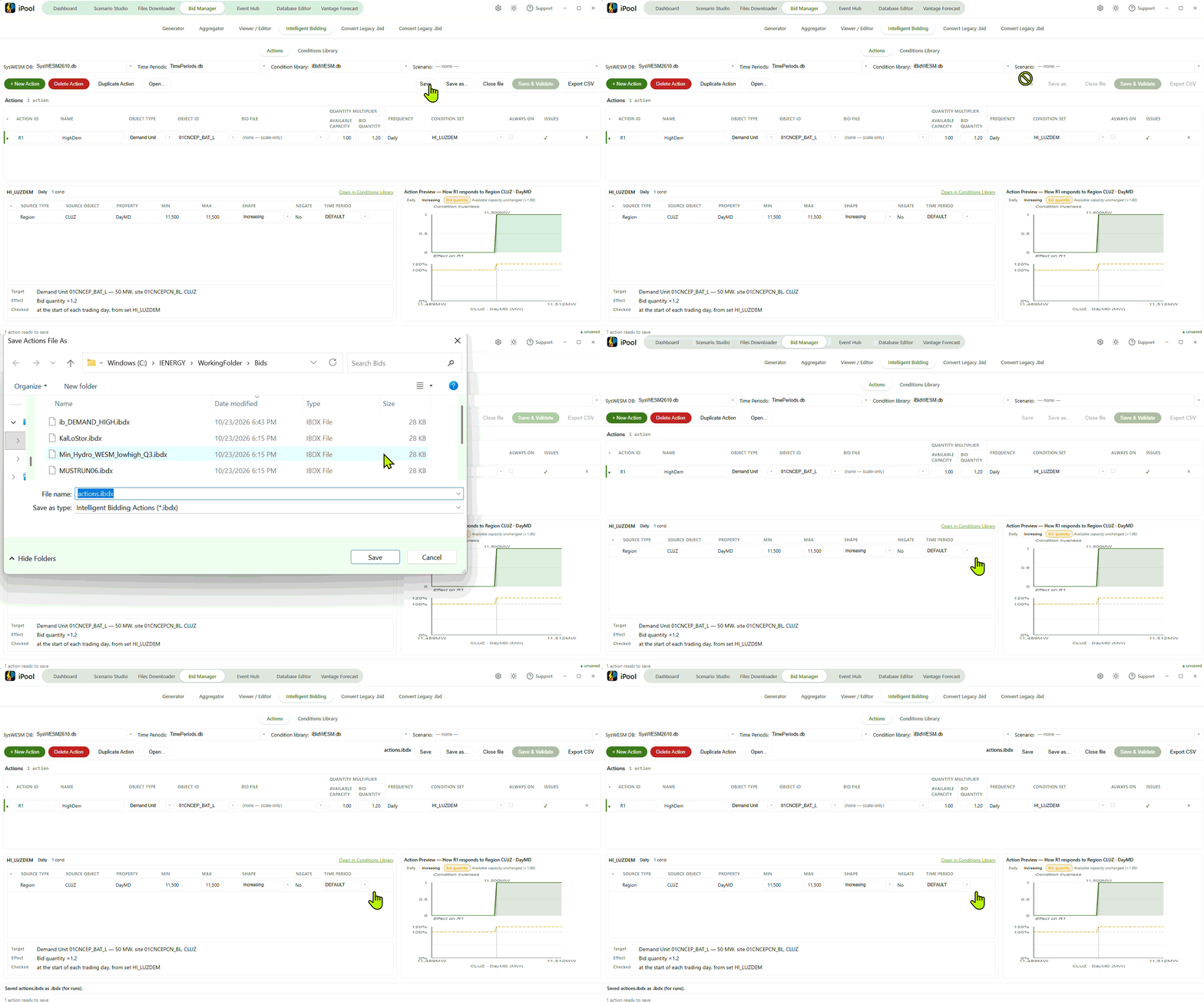
Click Save to save the actions to ib_<scenarioName>.ibdx in DirBid. If the
file already exists, an overwrite confirmation appears.
Click Save as... to choose a different name or location.
Click Close file to reset the editor to a blank state (the file on disk is not deleted).
Click Export CSV for a human-readable copy. Note: CSV rules ADD to scenario
rules; .ibdx rules REPLACE them.
Save and Validate
Click Save and Validate (requires a scenario to be selected). The button saves the file and then checks your rules for errors.
Results appear in the Engine messages panel in the Inspector pane. The Inspector pane is always visible in the Actions sub-tab.
Errors (ERR_IBD_*) and warnings (WARN_IBD_*) are shown per action.
Run
Pass the -ib flag when running the scenario:
iPool.exe ... -ib ib_<scenario>.ibdx
To disable intelligent bidding for a run without removing the rules file:
iPool.exe ... -ib 0
Do not combine -ib 0 with a rule filename.
The engine accepts both .ibdx format and legacy .ibd files. To convert a
legacy .ibd file, use the Convert Legacy .ibd tab in Bid Manager (a separate
tab, not part of this workflow).
The engine accepts both .ibdx format and legacy CSV .ibd files. Convert legacy
.ibd files to .ibdx using the Convert Legacy .ibd tab in Bid Manager before using
them with this workflow.